Step 01
Plug it in
Ethernet from your modem to Shield. Power on. Join the Wi-Fi network Shield broadcasts — or open the local setup page from any browser on your network.
Shield connects to your existing modem over Ethernet. Your phones, laptops and TVs keep using the Wi-Fi they already use. Filtering decisions and the dashboard run on the device on your network, not in someone else's cloud.
“This is the architecture I would build if I were the buyer. Local-first because protection should not depend on a third party. Signed updates because you should be able to verify what is running on your device. Public filter lists because trust is something you earn one inspectable line at a time.”, Founder, WOMBATS Shield
Step 01
Ethernet from your modem to Shield. Power on. Join the Wi-Fi network Shield broadcasts — or open the local setup page from any browser on your network.
Step 02
Have your modem's admin login handy — the one printed on the modem's sticker. Press one button and Modem Autopilot recognises your modem and applies the right DNS and DHCP settings for you.
Step 03
Apply the settings. From this point on every device on your network goes through Shield.
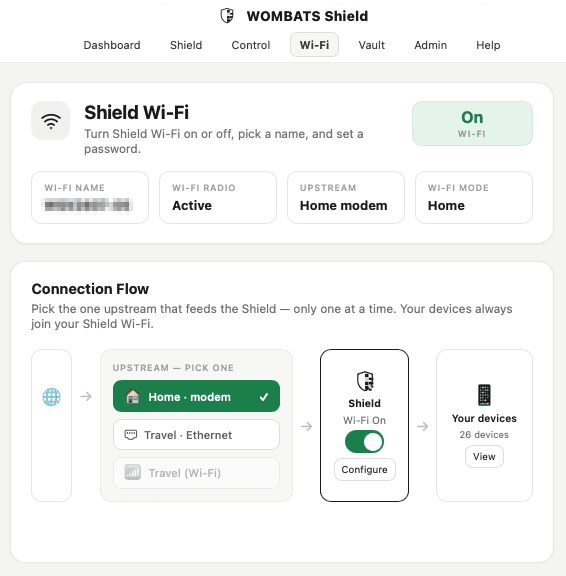
Tested with Telstra, NBN Co, Optus and major retail modems. Mesh Wi-Fi, double-NAT and ISP-locked routers usually work — some app-managed mesh systems need Guided Setup instead of Autopilot. If your network setup is unusual, talk to us before ordering, founding members get hands-on setup help.
For step-by-step instructions on each page of Shield's local dashboard, see the owner guides.
WOMBATS Shield filtering
Track ads, trackers, adult content and malicious domains blocked across your network from the local WOMBATS dashboard.
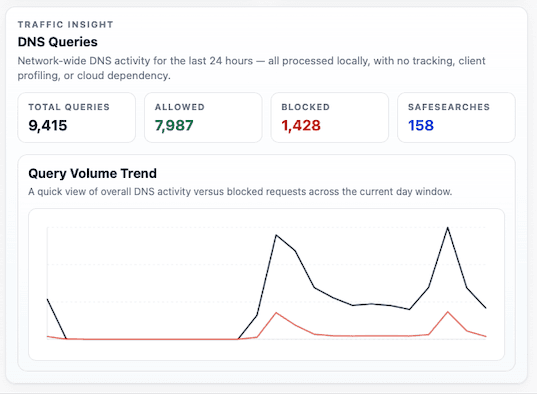
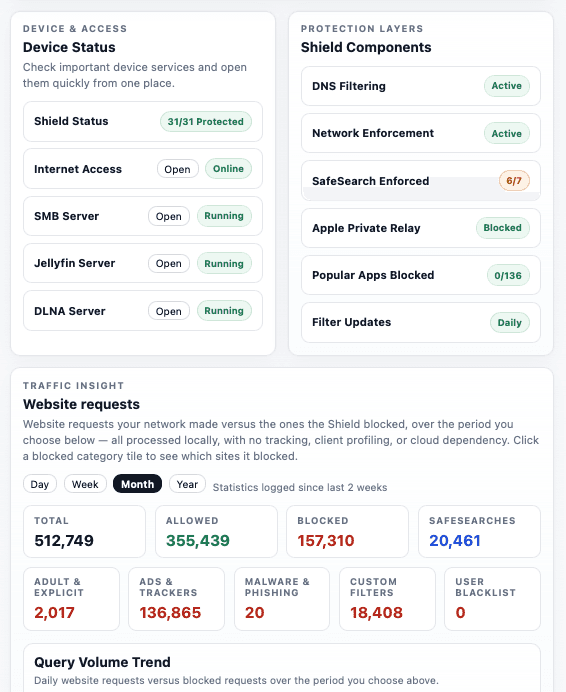
External tool. Results may vary depending on your network configuration.
When a device on your network tries to reach a website or service, it almost always starts with a DNS lookup. Shield evaluates that lookup against your active filter sources and policy, then either finds the address or stops it at the door.
A laptop, phone or TV asks the network: "where is example.com?"
Shield evaluates the lookup against your active filter lists, household categories and per-device policy.
If blocked, the connection never starts — quietly. If allowed, Shield finds the address: at home it asks the internet's own address servers itself, so no DNS company sees your household's lookups; away from home it sends an encrypted lookup to a provider you choose — Cloudflare by default.
Local nftables rules resist common encrypted-DNS bypass paths and Apple Private Relay traffic on the network.
More on the security and disclosure side at /security.
A network‑level appliance has clear boundaries. We'd rather name them up front.
The full version is on the threat model page.
Founding price locked in for life. No subscriptions.